Retro 1980s video from your photo
Turn a single photo into a cinematic 1980s ‘hero walk’ reel. The trick: ask ChatGPT to write a rich, movie-style prompt, then paste it into Google Gemini with your photo and let Veo animate it. No editing skills needed—just a good prompt and a few minutes of waiting.
How to use it
Use toolEverything you need for this tool is on this page. Overview, safety, and pricing are in “More about this tool” at the bottom.
This uploads a real photo of a person and animates their face, so a grown-up should set it up and decide what gets shared. Use only a photo you’re allowed to use, keep it a fun family reel (not fake ‘news’ or a real event), and follow Gemini’s and ChatGPT’s terms and your local rules on likeness.
Flow: open ChatGPT and ask it to write a detailed 1980s ‘hero walk’ video prompt → copy the prompt → open Gemini, upload your photo, and paste the prompt → wait a few minutes and your video is ready. The full example prompt is in Step 3 below—copy it and tweak the city, era, or outfit.
-
Pick one clear photo
Choose a single, well-lit photo of the person facing the camera, with the face clearly visible. This is what Gemini keeps ‘recognisable’ while it restyles everything around it. A plain background and a straight-on angle usually give the best result.
Tip: Only use a photo you have permission to use. For kids, a grown-up should choose and upload it.
-
Ask ChatGPT to write the prompt
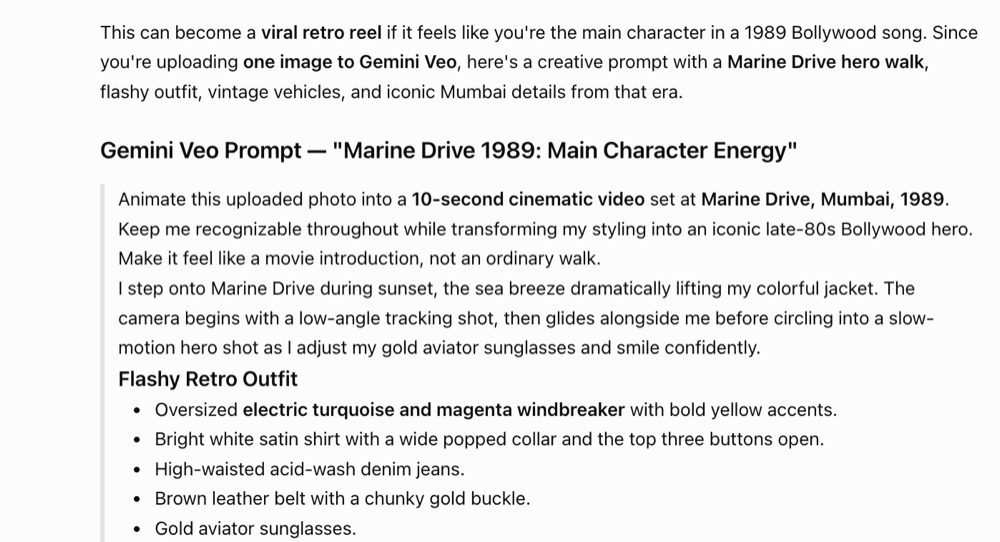
Open ChatGPT and describe the vibe you want—for example: “Write a detailed cinematic video prompt to animate my uploaded photo into a 1989 Bollywood hero walking down Marine Drive, Mumbai, with retro outfit, vintage cars, and film-grain style.” ChatGPT returns a long, scene-by-scene prompt you can copy. Writing prompts here is free.
Tip: The more specific the outfit, cars, and lighting, the more the video ‘feels’ like the era. Ask ChatGPT to add details if it feels thin.
-
Copy this ready-made prompt (or ChatGPT’s)
Here’s the exact prompt behind the example reel. Copy it as-is for a 1989 Mumbai look, or change the highlighted bits (city, year, outfit, cars) to make your own era—1980s New York, 1970s London, and so on.
Gemini Veo prompt (copy & edit)
Animate this uploaded photo into a 10-second cinematic video set at Marine Drive, Mumbai, 1989. Keep me recognizable throughout while transforming my styling into an iconic late-80s Bollywood hero. Make it feel like a movie introduction, not an ordinary walk.

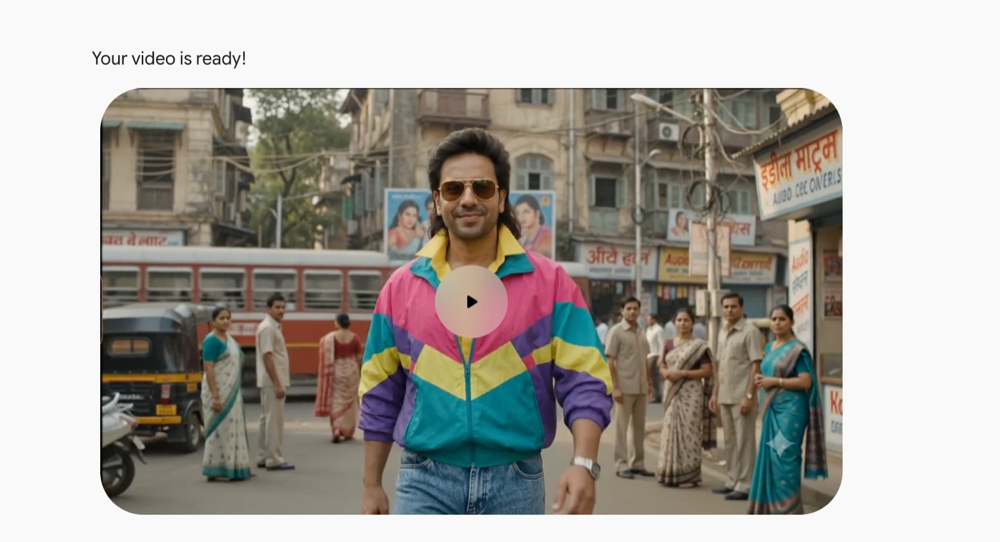
I step onto Marine Drive during sunset, the sea breeze dramatically lifting my colorful jacket. The camera begins with a low-angle tracking shot, then glides alongside me before circling into a slow-motion hero shot as I adjust my gold aviator sunglasses and smile confidently.

Flashy Retro Outfit
- Oversized electric turquoise and magenta windbreaker with bold yellow accents.
- Bright white satin shirt with a wide popped collar and the top three buttons open.
- High-waisted acid-wash denim jeans.
- Brown leather belt with a chunky gold buckle.
- Gold aviator sunglasses.
- Thin gold chain, vintage wristwatch, and a chunky gold bracelet.
- Thick feathered mullet hairstyle moving naturally in the sea breeze.

Make every frame scream "1989 Mumbai"
- Red BEST double-decker buses passing behind me.
- Maruti 800, Ambassador Mark IV, Premier Padmini, and Contessa Classic cruising along Marine Drive.
- Yellow-black Mumbai taxis and Bajaj Chetak scooters.
- Rajdoot and Yezdi motorcycles parked near the promenade.
- Vintage coconut water cart, roasted peanut seller, and kulfi vendor.
- Hand-painted "Video Cassette Library," "STD/ISD Booth," and old Coca-Cola wall advertisements.
- Couples sitting on the Marine Drive seawall, people in bell-bottoms, colorful windbreakers, safari suits, and bright silk sarees.
- Palm trees swaying, vintage curved streetlights, overhead electric wires, and the Queen's Necklace stretching into the distance.
- Absolutely no smartphones, LED billboards, SUVs, glass towers, or modern branding.

Cinematic Style
Shot like a 1989 Bollywood music video on Kodak 35mm film with rich saturated colors, authentic film grain, warm golden-hour glow, soft halation around lights, subtle anamorphic lens flares, and smooth cinematic camera movement.

Hero Moments
- The wind catches my jacket dramatically.
- I briefly remove my aviators and glance at the camera.
- A red BEST bus crosses behind me at the perfect moment.
- The shot ends with me walking toward the sunset as vintage cars pass by.
Tip: The line ‘Keep me recognizable throughout’ is what makes it feel like you. Keep that line whatever era you choose.
-
Open Gemini and upload your photo
Go to gemini.google.com and sign in with a Google account. Use the image / upload button to attach the photo from Step 1. Video generation runs on Google’s Veo model—free access is limited, so a paid Google AI plan may be needed for more or longer clips.
Tip: If you don’t see a video option, check that your account has access to Veo video generation—limits and plan names change over time.
-
Paste the prompt and generate
Paste the prompt into Gemini (with your photo attached) and send it. Then wait—video generation usually takes a few minutes. Keep the tab open while it works.
Tip: If the result drifts from your face, regenerate, or shorten the scene list so the model focuses on ‘keep me recognisable’.
-
Watch, download, and share your reel
When it finishes, Gemini shows ‘Your video is ready!’ with a player. Watch it back, download the clip, and share it as a fun retro reel. Because it animates a real face, keep sharing family-friendly and be clear it’s AI-made.
Tip: Add licensed retro music in a free editor like CapCut for an even stronger 80s feel.
More about this tool — overview, features, safety, pricing
Overview
This is a two-tool trick: ChatGPT is the ‘writer’ that turns a simple idea into a rich, cinematic video prompt, and Google Gemini (with its Veo video model) is the ‘director’ that animates your uploaded photo from that prompt.
The example turns a normal selfie into a 1989 Marine Drive ‘hero walk’—but the same steps work for any era or city. Change the year, outfit, and background details in the prompt and you get a completely different retro world.
Writing the prompt is free. The video step depends on Gemini’s current Veo limits, which are usually capped on the free tier and may require a paid Google AI plan.
Key features
- ChatGPT does the hard part. Instead of guessing at wording, you let ChatGPT expand a one-line idea into a full scene: outfit, vehicles, lighting, camera moves, and ‘what to avoid’.
- Keeps you recognisable. The prompt tells Veo to preserve the real face while restyling everything else, so the reel still looks like you (or your child).
- Any era, any city. Swap the year, place, clothes, and background props and the same recipe makes 70s London, 80s New York, or a retro hometown scene.
- No editing skills needed. One photo plus one prompt gives a finished short clip—no timeline, keyframes, or editing software required to get the first result.
Safety & privacy notes
Data & accounts
- You upload a real photo to Google’s servers for processing—read Gemini’s privacy terms before uploading a child’s photo, and prefer photos without other people, addresses, or school logos in the background.
- ChatGPT and Gemini both keep account history by default; a grown-up can review or clear it in each service’s settings.
Supervision
- An adult should own the accounts, pick and upload the photo, and approve the final clip before it’s shared anywhere.
Content & community
- Because this animates a real face, treat it like a deepfake tool: keep it clearly fun and AI-made, never present it as a real event or news, and don’t make videos of other people without their okay.
- Both tools may refuse certain prompts—if a prompt is blocked, change it rather than trying to bypass the safety filter.
Family project ideas
- Pick your decade. Make the same person as an 80s pop star, a 70s detective, and a 90s cricketer by only changing the outfit and background lines in the prompt. (20–30 min)
- Hometown time machine. Set the scene in your own city ‘40 years ago’—ask ChatGPT for era-correct cars, shops, and signs, then generate the reel. (20 min)
- Prompt detective. Generate once, then tweak one detail at a time (lighting, camera move, a single car) and watch how each line changes the video. (15 min)
Pricing & account
Freemium — video may need a paid plan — Writing the prompt in ChatGPT is free. Generating the video in Gemini uses Google’s Veo model, which is usually limited on the free tier and may need a paid Google AI Pro / Gemini plan for more or longer clips—check the current limits on the site before you rely on it.
Account required: Yes
Platforms: web, mobile