Create games with Claude Artifacts
Open Claude Artifacts, pick Games, describe any game idea, and in about a minute get a playable browser game—Tetris, tic-tac-toe, quizzes, and more—right in the chat panel.
How to use it
Use toolEverything you need for this tool is on this page. Overview, safety, and pricing are in “More about this tool” at the bottom.
A parent’s Claude account (18+) should run Artifacts. Review the generated game and any code before kids play or share. Do not paste personal data into prompts.
Flow: open claude.ai → click Artifacts in the sidebar → choose Games → describe your game → confirm the plan → play in the Artifact panel. Simple games often appear in about a minute.
-
Open Claude and click Artifacts
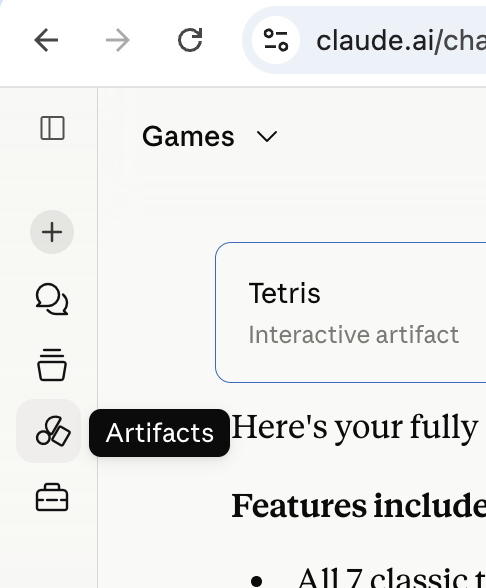
Sign in at claude.ai with a parent account. In the left sidebar, click the Artifacts icon (circle and diamond shape). This opens Claude’s workspace for building interactive pages—not just chat text.
-
Select the Games category
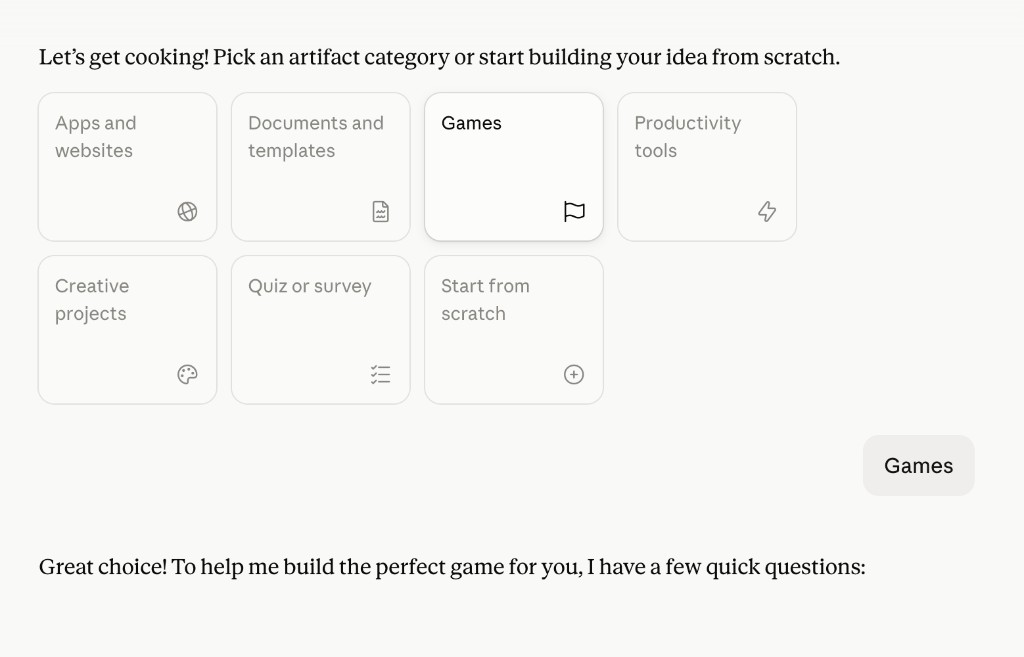
Claude shows a grid of artifact categories. Tap Games (flag icon). Claude will ask a few quick questions to understand what you want—genre, players, controls, and style.
Tip: If you do not see the category grid, type “I want to build a game” in chat—Claude will still guide you through the same flow.
-
Describe the game you want
Answer Claude’s questions or type your game idea directly. Be specific about rules, controls, and how someone wins. Claude may show a short game plan first—read it together and reply yes to start building.
Example prompt
Build a classic Tetris game. Use a 10×20 board with all 7 standard tetrominoes in their classic colors. Arrow keys move and rotate, Down for soft drop, Space for hard drop. Show score, level, lines cleared, and a next-piece preview. Add a ghost piece and a Start Game button.
-
Wait while Claude builds the game
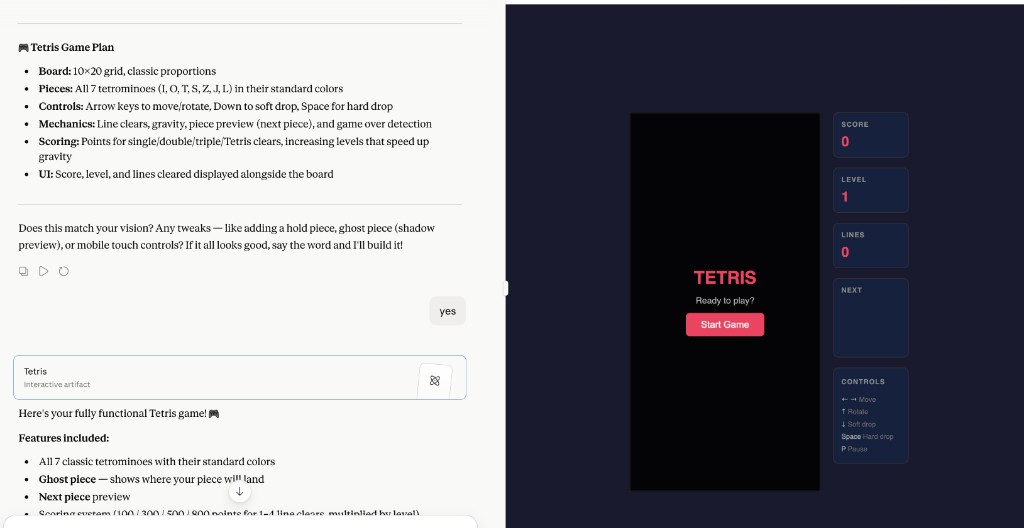
Claude generates HTML, CSS, and JavaScript inside an Artifact card in the chat. A split view opens: chat on the left, your game on the right. Simple arcade games often finish in about a minute; bigger ideas may take a bit longer. Stay on the tab while it builds.
Tip: If generation stops early, ask: “Continue building the game” or “Fix the bug when…”
-
Play your game in the Artifact panel
When the Artifact is ready, the game runs in the right panel—click Start Game, use the keyboard or on-screen controls, and play. Ask follow-ups in chat to add sound, change colors, tweak difficulty, or fix bugs without starting over.
-
Iterate and learn
Try follow-up prompts: “Add a high-score table,” “Make the buttons bigger for kids,” or “Explain how line clearing works in the code.” Each change updates the same Artifact. Talk about what HTML, CSS, and JavaScript are doing—Artifacts are a fun intro to “games are programs.”
Tip: Start with classic games (Tetris, snake, tic-tac-toe, memory match) before complex 3D ideas—smaller prompts finish faster and fail less often.
More about this tool — overview, features, safety, pricing
Overview
Claude Artifacts turns natural-language game ideas into a playable browser mini-game—HTML, CSS, and JavaScript in a split chat + preview workspace.
Families can prototype board games, arcade classics, or quiz games without installing an IDE; a parent should supervise account use and review output.
Simple games like Tetris or tic-tac-toe often appear in about a minute; complex requests may need shorter prompts or follow-up messages.
Key features
- Prompt-to-playable game. Pick Games, describe rules in plain English, and Claude builds a single-page game you can play immediately in the Artifact panel.
- Guided game planning. Claude asks clarifying questions and shows a plan before building—good for learning how to specify game design.
- Live split view. Chat and game side by side so kids connect “what we typed” with “what runs.”
- Easy remixing. Follow-up messages adjust mechanics, layout, or difficulty without starting from scratch.
- No local install. Runs in the browser through Claude—good for a quick weekend project.
Safety & privacy notes
Data & accounts
- Requires an Anthropic account; prompts and generated code are processed by Anthropic. Do not include real names, schools, or photos of children in game prompts unless you accept Anthropic’s terms.
Supervision
- Parents should own the account, approve prompts, and check games for inappropriate text or imagery before kids play.
Content & community
- AI can produce buggy or surprising behavior—treat online play as supervised. Sharing Artifact output may expose your prompt; use family judgment.
Family project ideas
- Classic Tetris. Use the example prompt, then ask for a two-player mode or different color themes. (15–20 min)
- Math quiz game. Ask for multiplication flash cards with score and celebratory animation when correct. (20 min)
- Two-player tic-tac-toe. Smallest possible game—compare first draft vs after asking for “bigger buttons and scoreboard.” (15 min)
- Snake with a twist. Classic snake, then ask Claude to add power-ups or a maze layout. (20 min)
Pricing & account
Freemium — Claude free tier works for simple games; Pro plans give more daily capacity. Confirm limits on claude.ai.
Account required: Yes
Platforms: web